Early adopters include engineers from Amazon, Bloomberg, Meta, and YC-backed startups
The MCP Configuration Problem
Without Pylee:
Manually configure environment variables, API keys, and secrets for each MCP server in every tool, for every team member.
With Pylee:
One-click deploy. Automatic secrets management. Configure once, use everywhere.
From Zero to Connected in 3 Steps
Create Account
Sign up for free. No credit card required.
Deploy MCP Servers
One-click deploy from registry or upload your own.
Connect Your Tools
Single config for Claude, Cursor, VS Code, and more.
Your MCP Infrastructure Hub
Pylee sits between your MCP sources and your development tools, handling all the configuration and connection complexity
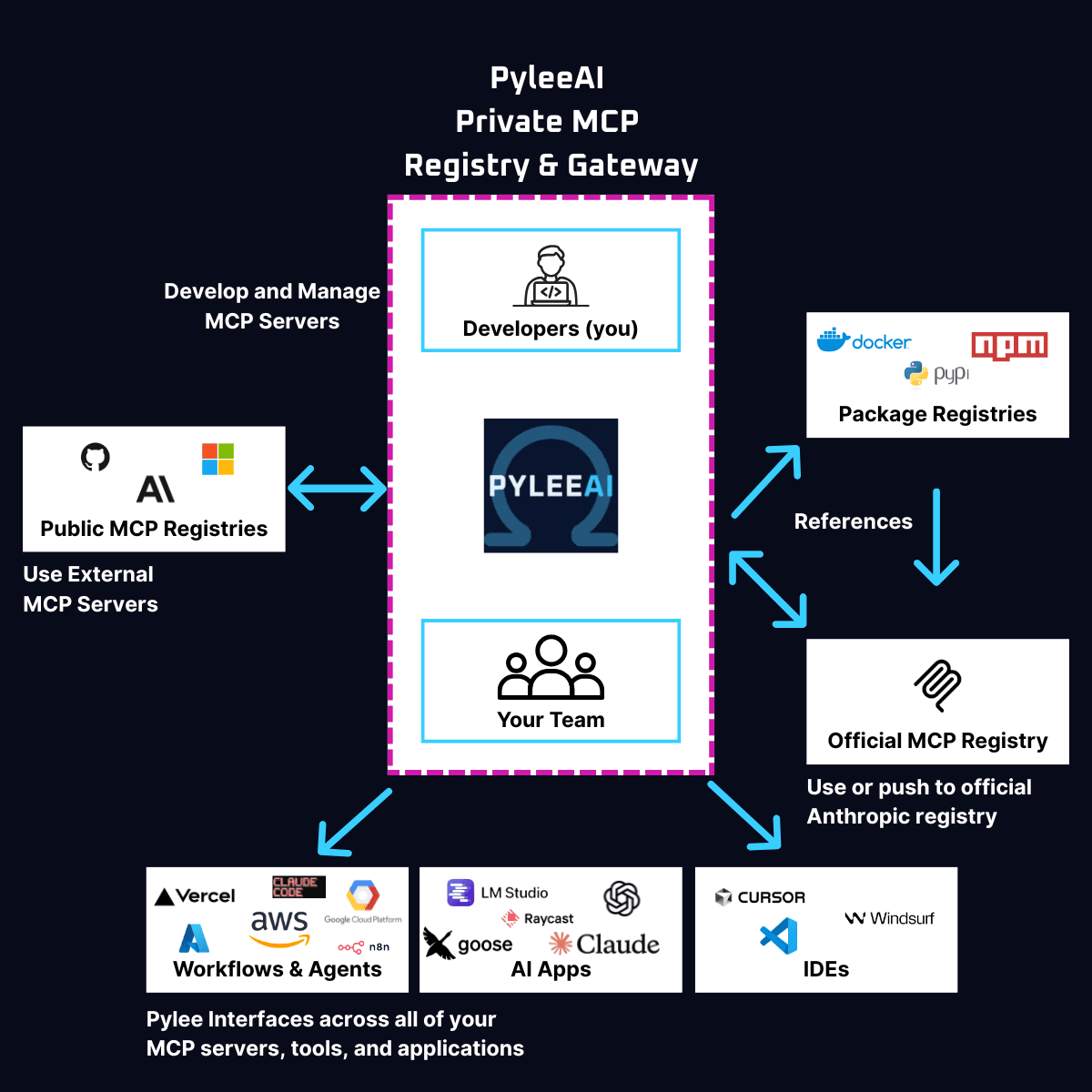
Built for Developer Productivity
60-Second Deployment
Click deploy. We handle secrets and environment variables. Your MCP server is live and accessible immediately.
Private Registries
Create team and project registries. Organize MCP servers by use case with granular access controls.
Automatic Secrets Management
Encrypted vault for all your API keys and secrets, automatically injected at runtime. No hardcoding.
Universal Compatibility
Works with Claude Desktop, Cursor, VS Code, and any MCP-compatible client. Write once, run anywhere.
Team Collaboration
Share MCP servers with your team without sharing credentials. Role-based access control built in.
Open Source Tools
CLI and proxy server available on GitHub. Deploy on your infrastructure or use our managed service.
Open Source & Enterprise Ready
Simple, Developer-Friendly Pricing
Start free today. No credit card required.
Free
Start building immediately
- ✓ Unlimited MCP servers
- ✓ Public registries
- ✓ Small Team collaboration
- ✓ Community support
Pro
Advanced features for teams
- ✓ Everything in Free
- ✓ Unlimited private registries
- ✓ Advanced analytics
- ✓ Custom integrations
Enterprise
Self-hosted & licensed
- ✓ Deploy on your infrastructure
- ✓ Full source code access
- ✓ SSO/SAML integration
- ✓ Dedicated support & SLA